Connect. Control. Secure.
Connect. Control. Secure.
Install a complete browser-based Lua development environment on an ESP32 and start building secure IoT applications, device dashboards, and hardware experiments.
Xedge32 brings the Xedge runtime to ESP32 hardware. Professional developers can use it to evaluate Xedge and the Barracuda App Server on a real microcontroller, while DIY developers and non-professionals can use it as an approachable way to build connected ESP32 projects without first becoming embedded C experts.
Secure Embedded Development Without the Usual Friction
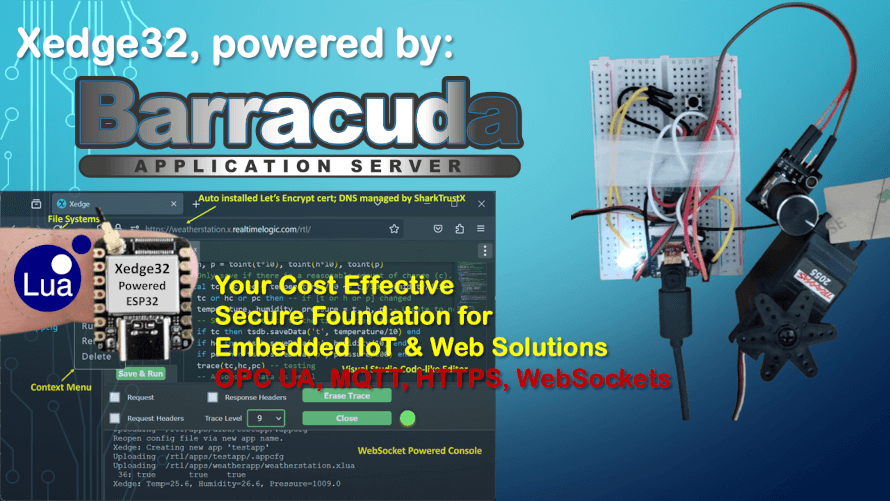
Xedge32 makes embedded web and IoT development accessible, but it is not just a toy environment. It combines browser-based development, Lua scripting, ESP32 hardware access, secure web services, and production-oriented source code for teams that need a practical path from experiment to product.
Xedge32 expands microcontroller-based IoT programming to a wider audience. The simplicity of Lua makes it easy to get started, while professional OEM developers can inspect the source code, customize the firmware, and integrate Xedge32 concepts into commercial products.
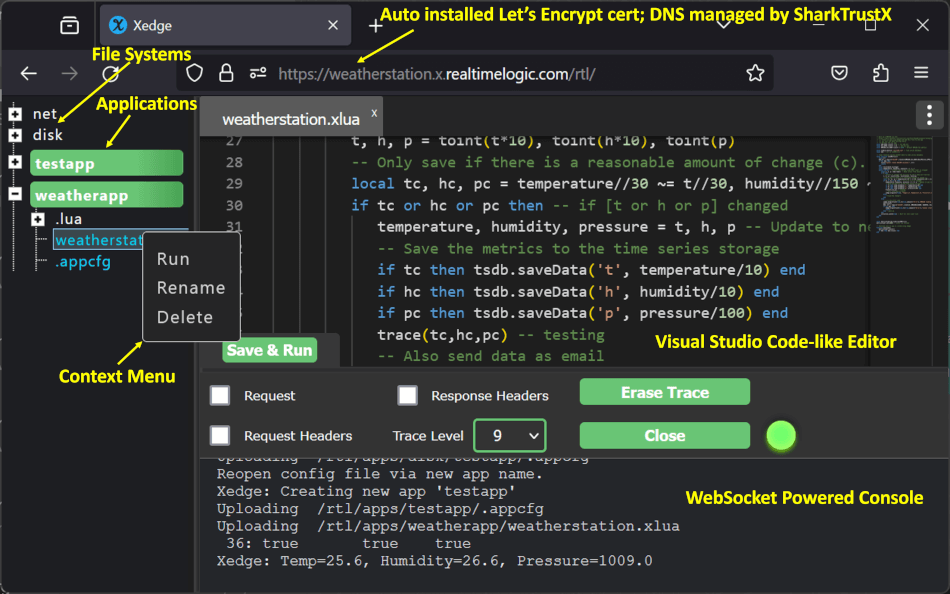
Xedge32 is a self-contained ESP32 development environment that lets you code directly from a browser.
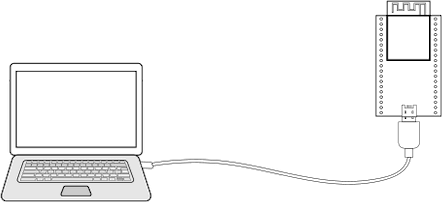
To install Xedge32 on your ESP32-S3 or ESP32-WROVER, first connect the ESP32's USB cable to your computer. Then, simply click the 'Install Xedge32' button below:
Upon clicking the above button, a list of devices will appear. Select the device that includes 'serial' in its name. Proceed with the installation wizard. Once installation is complete, reboot the ESP32 by unplugging and then replugging the USB cable. Your ESP32 will now be in access point mode. For guidance on configuring and using Xedge32 in this mode, refer to the ESP32 Access Point Mode documentation. Note: Certain ESP32 models require entering boot mode (Firmware Installation Mode) for proper firmware installation operation. You can do this by pressing and holding the boot button while connecting the USB cable. The initial 40 seconds of this video show the exact process for entering boot mode.
Advanced users can install Xedge32 directly via the command line or compile the Xedge32 source code for a customized build. While Xedge32 is designed for professional use and seamless OEM integration, it is equally suitable for hobbyists and developers who want to leverage its powerful features right out of the box without requiring OEM customization.
Xedge32 is a development platform for the ESP32 microcontroller built upon Xedge, which constitutes 90% of Xedge32's functionality and offers a wide range of IT and OT protocols, referred to as the north bridge. Xedge32 extends the Xedge's Lua APIs and provides a comprehensive interface to the ESP32's GPIOs, referred to as the south bridge.
With Xedge32, you can develop a full-fledged solution without diving into C programming. You can write device-specific code in the user-friendly Lua language, significantly reducing development time. However, OEM integrators can easily extend its functionality, allowing them to add additional features and tailor the solution to their specific needs.
Xedge32 goes beyond simple GPIO sampling by fully integrating with ESP32's interrupts, leading to powerful implications for various applications:
Augmenting the ESP32 with Ethernet capabilities is seamless with the W5500 chip, a simple, compact, and low-power Ethernet module. Together, these components create a dynamic, networked communication platform that extends the ESP32 beyond its standard Wi-Fi capabilities. The highlight is that Ethernet capabilities can be enabled effortlessly using Lua with the stock firmware.
Xedge32 includes a broad set of IoT and industrial capabilities for ESP32 applications, including MQTT, OPC UA, Modbus, HTTP, REST, WebSockets, and embedded web server based device management. See the IoT Toolkit Reference Manual for details.
Xedge32 is a practical bridge between experimentation and product engineering. It gives beginners a friendly way to build ESP32 IoT projects while giving professional developers a realistic environment for evaluating Xedge, BAS, Lua, C integration, and secure microcontroller-based IoT design.
While NodeMCU has been a go-to option for hobbyists diving into embedded systems using Lua, Xedge32 takes it a step further by catering to both professionals and hobbyists alike. Xedge32 is specifically designed for the ESP32 and offers a robust set of features and protocols, making it suitable for both simple and complex enterprise-level projects.
Arduino has long been the go-to platform for hobbyists due to its simplicity and vast community support. Xedge32, on the other hand, builds on the ESP32's capabilities with a Lua-based, non-blocking framework suited for both hobby and professional-grade applications, offering greater flexibility for complex, connected projects. See Arduino vs. Xedge32 for details.
While MicroPython is popular among hobbyists due to its Python-like syntax and straightforward development flow, it wasn't designed for professional embedded use. Xedge32, built on Lua and explicitly tailored for embedded use, goes much further and simplifies professional OEM integration. If you're comparing MicroPython and Xedge32 for serious embedded work, read the full breakdown here: MicroPython vs Xedge32: The Engineer's Guide.
Node-RED is designed for OT/IT/edge gateway environments, where it orchestrates data flows and integrations on Linux-based systems, whereas Xedge32 targets similar environments but runs directly on microcontrollers, providing deterministic control, secure device-level logic, and direct hardware access in resource-constrained industrial systems. See Node-RED vs. Xedge32 for details.
The original ESP8266 was designed as a Wi-Fi co-processor. Today, with the ESP32 and Xedge32, that concept has evolved into a modern solution that lets hardware engineers quickly Internet-enable legacy devices with minimal effort.
The following video shows how easy it is to install Xedge32 and how to configure the WiFi settings.
Xedge32 is constructed utilizing components from the Barracuda App Server. See the Barracuda App Server's GitHub Repo for license details.
In today's landscape, misconceptions, rigid ideas, and biases often cloud our understanding. The article Low-Code and Easy IoT Embedded Systems Programming offers a fresh perspective for those navigating the complexities of MCU-based IoT solutions. By exploring the capabilities of an Xedge32-powered ESP32, you will gain insights that could lead to more efficient and cost-effective solutions for your organization.
Lua is the fastest non-JIT scripting language, with Lua code being compiled into bytecode and executed on the Lua virtual machine.
The above video showcases our MQTT 5 stack, entirely implemented in Lua, demonstrating the speed and efficiency of Lua programming. It also features the Lua LED strip test program, part of the Xedge32 documentation. Combining an MQTT test program with the LED strip test program highlights Lua's powerful capabilities in real-time processing on a microcontroller.