Xedge32 Introduction
Xedge32 is the ESP32 edition of Xedge. It lets you build and test Lua applications directly on an ESP32 board, while also giving Lua code access to ESP32 hardware such as GPIO, I2C, UART, PWM, ADC, RMT, camera modules, networking, storage, and firmware update services.
If you are new to BAS, Xedge, and Xedge32, start with the overview article How Xedge32, Xedge, and Barracuda App Server Work Together. It explains the relationship between the general Barracuda App Server runtime, the generic Xedge development environment, and this ESP32-specific firmware.
What This Manual Covers
This manual focuses on what is specific to Xedge32:
installing and configuring the ESP32 firmware,
using the Xedge workflow on an ESP32 board, and
controlling ESP32 hardware through the
esp32Lua module.
It does not repeat the full generic Xedge or Barracuda App Server manuals. Use those documents when you need the broader web, security, protocol, file system, or application framework APIs:
The Three Layers
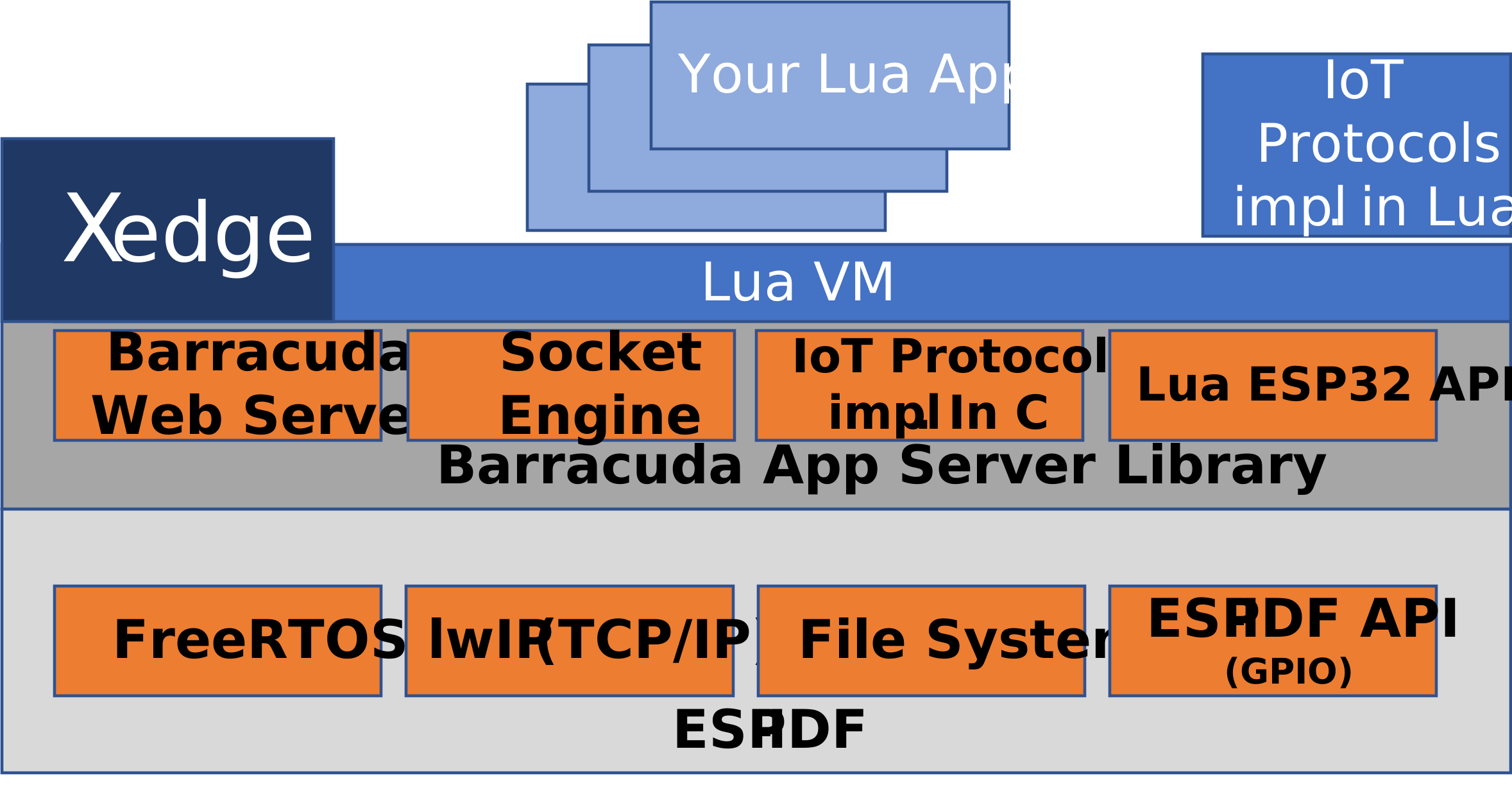
Xedge32 use three layers together:
- Barracuda App Server
The portable embedded application server foundation. It provides the web server, Lua integration, security, protocols, I/O abstractions, and runtime services.
- Xedge
The Lua application model and browser-based development environment. It is not ESP32-specific.
- Xedge32
The ESP32 firmware that combines Xedge with ESP32-specific Lua APIs. This is the layer that lets Lua code work with pins, buses, sensors, and other board features.
For a DIY maker, the practical result is simple: flash Xedge32, open the web interface or LuaShell32, and start testing Lua code against real hardware without first writing C firmware.
Lua and C
The built-in APIs are Lua APIs. You normally do not need C code to read a sensor, toggle a pin, connect Wi-Fi, or build a small device dashboard.
The firmware itself is written in C and wraps selected ESP-IDF features for Lua. Developers who need custom native features can build and extend the firmware from the Xedge32 repository, but that is an advanced workflow. Start with Lua unless you have a specific reason to change the firmware.
Callbacks and Polling
Many ESP32 peripherals can work in an event-driven style. When an API provides a callback, prefer that callback for responsive applications. Polling with a timer is still useful for slow checks, simple experiments, and one-shot reads, but callbacks are usually the better model for serial input, GPIO interrupts, RMT receive jobs, PCNT watchpoints, and similar events.
Hardware Resource Lifetime
Most hardware APIs return Lua objects such as GPIO, UART, I2C, PWM, PCNT, RMT,
ADC, or camera objects. Keep a reference to the object for as long as you need
the hardware to stay open, and call :close() when you are done.
Short experiments can also use Lua’s <close> syntax:
local led <close> = esp32.gpio(18, "OUT")
led:value(true)
ba.sleep(1000)
This is convenient in Lua Server Pages and during hot reloading because the resource is released automatically at the end of the scope. Long-running applications should keep explicit references to active hardware objects so the garbage collector cannot release them unexpectedly.
Pin Safety
ESP32 boards vary. A GPIO number that is safe on one board may be connected to flash, PSRAM, USB, boot strapping, a camera, an SD card, or another fixed function on another board. Start with the pinout for your exact board, avoid reserved pins, and use current-limiting resistors when driving LEDs or other loads directly.
Xedge ESP32
Contents:
- Getting Started
- Access Point Mode
- LuaShell32
- Xedge32
- ADC API
- Camera API
- GPIO API
- I2C API
- PCNT API
- PWM API
- RMT API
- Application Examples
- RMT Symbol Layout
- Understanding Tick Resolution
- Lua RMT Symbol Representation
- Lua RMT Byte Encoding
- RMT TX API
- Creating a TX Channel
- TX Configuration Options
- TX Object Methods
- TX Example 1: Musical Score
- TX Example 2: WS2812B LED Strip
- RMT RX API
- Creating an RX Channel
- RX Configuration Options
- RX Object Methods
- RX Example: 1-Wire Temperature Read
- Practical Guidance
- UART API
- Miscellaneous API
- BME280 Module
- Modbus RTU Module
- Tutorials and AUX APIs
- Applications
- License