A certificate tells your application who claims to be at the other end of a TLS connection. Trust checks determine whether your application accepts that claim. This guide explains what to install in SharkSSL and how to convert certificates for your device.
In the certificate-based connections described here, the server needs an identity certificate and its matching private key. The client needs trusted Certificate Authority (CA) certificates to validate the server. A client identity certificate is needed only when the server requests certificate-based client authentication.
Keep these three items separate
| Item | Purpose | Handling |
|---|---|---|
| Identity certificate | Associates a public key with a server or client identity. | Sent to the peer during certificate authentication. |
| Private key | Lets its holder prove possession of the key associated with its identity certificate. | Keep secret. Provision it only to the system using that identity. |
| Trusted CA certificate | Identifies an authority your application accepts as a source of peer certificates. | Install from a trusted source before connecting. It contains no CA private key. |
A certificate chain links a peer certificate through intermediate CA certificates to a trusted authority. The peer's supplied chain does not by itself make that authority trusted.
For a TLS client, check the trusted authority, the expected server name, and certificate validity dates as required by your product. Use SharkSslCon_trusted with the expected domain name and handle its SharkSslConTrust result before sending sensitive data. Date checking requires SHARKSSL_CHECK_DATE and a correct device clock. SharkSslCon_trustedCA alone does not check the server name.
Certificate management is a complex component that is generally required by all applications using the SSL protocol. We provide an online certificate management tutorial for those that are new to certificate management.
The Certificate Management for IoT tutorial shows how to use our certificate management tool for setting up a certificate authority and signing certificates by using this tool. The tutorial is tailored for devices using SharkSSL as a client.
Certificate file formats
An X.509 certificate stores a public key, identity information, validity dates, and an issuer's signature. You will encounter these file formats:
- DER: binary encoding of an X.509 certificate.
- PEM: Base64-encoded data with text markers such as
-----BEGIN CERTIFICATE-----. A private key can also be stored in PEM, but it is a separate kind of object. - P7B: a container that can hold multiple certificates.
File extensions are conventions. Check the contents and the accepted input formats of the conversion tool you use.
Choose your trust model
For a service you control, you can provision devices with your own CA certificate. You then manage that CA's private key, certificate issuance, renewal, and updates to the devices' trust store. See certificate management for IoT for a worked example.
For a third-party service, install the trusted authorities needed by that service and plan how to update them. Do not install a received peer certificate as a trusted root merely to make a connection succeed.
Certificate Management with SharkSSL
SharkSSL uses its own binary format for storing certificates, a format optimized for speed and size thus making it ideal for small microcontrollers. SharkSSL includes high level functions that converts standard .PEM, .DER, and .P7B formats into its internal format. The high level functions are included in the SharkSSL source by default, but we recommend that you disable this code in microcontroller based applications. You can control the inclusion/exclusion of these functions by tuning the SharkSSL_cfg.h configuration file. In particular, the macro SHARKSSL_ENABLE_PEM_API and SHARKSSL_ENABLE_CERTSTORE_API either excludes or includes the certificate management functions.
We provide a number of command line programs that can convert standard certificates into the optimized SharkSSL format. You use these command line tools when you exclude the high level certificate functions from the SharkSSL code base.
Using the High Level SharkSSL Certificate APIs
The high level SharkSSL certificate APIs enable you to load and convert certificates to the internal format used by SharkSSL. The converted certificates are stored in RAM memory (it is for this reason we recommend that you do not include the high level APIs when using SharkSSL in a microcontroller). The APIs are divided into loading SharkSSL certificates and for loading CA root certificates.
SharkSSL Certificate
A SharkSSL certificate is a combination of the certificate (the public part) and the certificate key (the private part). The following figure shows how the SharkSslParseCert tool converts these two components into one SharkSSL certificate.
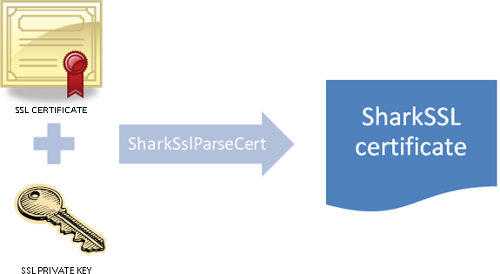
A SharkSSL certificate is loaded and converted to the internal format by calling function sharkssl_PEM. The resulting SharkSSL certificate can then be used as the SharkSslCert argument when calling the SharkSsl_addCertificate function. The high level sharkssl_PEM certificate function performs the same conversion as the command line tool SharkSslParseCert.
CA Certificate
For CA-based peer authentication, install the authorities your application trusts. To build a list at runtime:
- Call SharkSslCertStore_constructor
- For each certificate, call SharkSslCertStore_add
- Finish by calling SharkSslCertStore_assemble
Function SharkSslCertStore_assemble converts and stores all CA certificates as a SharkSslCAList object. This object can then be used as an argument when calling SharkSsl_setCAList. The SharkSslCertStore functions perform the same conversion as the command line tool SharkSSLParseCAList.
SharkSSL Certificate Command Line Tools
The SharkSSL certificate command line tools convert X.509 certificates from various formats to the proprietary SharkSSL formats. The tools are used when the high level SharkSSL certificate APIs are excluded from SharkSSL at compile time. The tools are also integrated in the certificate management tool.
The tools can create either a binary file or a C header containing the binary data in a C array. Protect converted identity data that contains a private key just as you protect the original key file.
Creating a C array is the most convenient method since the header file includes data that can be fed directly into the API function. Use a binary file if you want to separate the certificate(s) from the firmware image. The binary file can for example be stored in a separate section in flash memory and the pointer to the start of this section can be fed to the API function.
SharkSslParseCert
A SharkSSL certificate is a combination of the certificate (the public part) and the certificate key (the private part). The following figure shows how the SharkSslParseCert tool converts these two components into one SharkSSL certificate.
Usage:
SharkSSLParseCert MyCertFile.cert MyPrivateKey.key [-p passkey] [-b MyBinFile.bin]

MyCertFile.cert : a certificate file, in PEM format and this
certificate must have been signed with either RSA or ECDSA. The
certificate's public key must be of type RSA or ECDH.

MyPrivateKey.key: private key file, in PEM format; must match the
public key in MyCertFile.cert and can be encrypted using 3DES,
AES-128 or AES-256

passkey: mandatory only when the private key is encrypted, this is
the encryption key (an ASCII string)
If the -b flag is not specified, the output goes to "stdout", thus it must be redirected to a file using the > operator. The -b flag can optionally be used instead of creating a header file. The binary certificate is then written to the filename following the -b flag.
Example:
SharkSSLParseCert MyCertFile.cert MyPrivateKey.key > MyCert.h
The SharkSSL certificate in MyCert.h can then be used as input when calling the SharkSsl_addCertificate function.
SharkSSLParseCAList
CA certificates are optional and can be used by SharkSSL to verify the peer side. The SharkSSLParseCAList converts one or multiple CAs into one SharkSslCAList object.
Usage:
SharkSSLParseCAList [-b MyCAList.bin] cert1.pem cert2.der certlist.p7b
If the -b flag is not specified, the output goes to "stdout", thus it must be redirected to a file using the > operator. The -b flag can optionally be used instead of creating a header file. The binary certificate is then written to the filename following the -b flag.
A sequence of parameter can be specified, each one being the name of a certificate in .PEM or .DER format, or a set of certificates in .P7B format
Example: SharkSSLParseCAList OneCert.pem ManyCerts.p7b >MyCaList.h
The CA list in MyCaList.h can then be used as input when calling the SharkSsl_setCAList function.
SharkSslParseKey
Usage:
    SharkSslParseKey \<privkey file\> [-p \<passkey\>] [-b \<binary output file\>]
    SharkSslParseKey \<pubkey file\> [-b \<binary output file\>]
SharkSSLParsePSKTable
Usage: SharkSSLParsePSKTable.exe <PSK file> [-b <binary output file>]