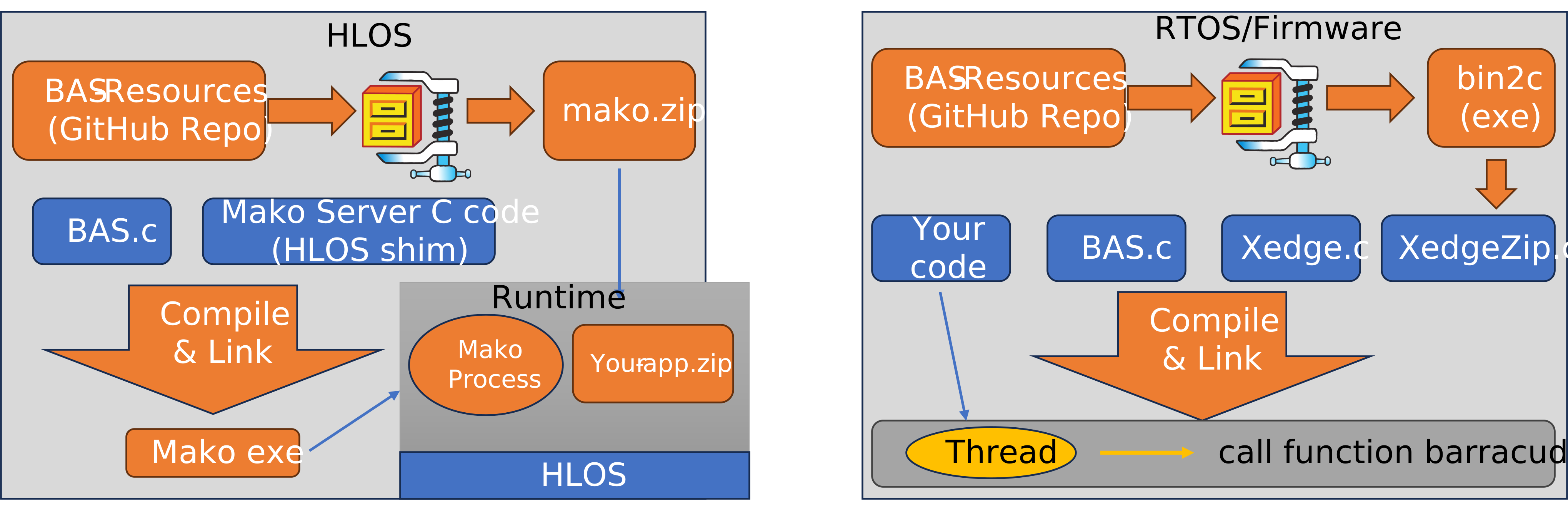
Figure 1: Mako Server keeps application resources separate on an HLOS, while Xedge can compile ZIP resources into RTOS firmware.
The Barracuda App Server (BAS) is a general-purpose application platform for embedded systems. Developers can build directly with native C/C++ or use Lua for business logic and protocol integration (e.g., OPC UA, Modbus, and MQTT). This section focuses specifically on BAS as a web application platform.
When developing web applications with BAS, it is important to understand two core concepts: the Virtual File System (VFS) and authentication. These form the foundation for how applications are structured, secured, and executed.
This introduction covers Lua/LSP applications and native C/C++ development. Use this overview to find the material that applies to your project:
cpp/rest library, authentication, and C Server Pages.If you are using Mako Server or Xedge, you can defer a deep dive into the VFS. These reference platforms handle much of the underlying setup, allowing you to get started quickly with building applications.
Similarly, authentication can be postponed if you are working with the Ready-to-Run Embedded Web Interface Template, as it includes a preconfigured authentication mechanism.
For a faster development path, Mako Server and Xedge users can jump directly to Lua Server Pages (LSP), which also provides a list of recommended tutorials and the Embedded Web Interface Template, enabling you to start building functional web applications immediately.
Modern web applications can require considerable storage, particularly Single Page Applications (SPAs) with large JavaScript and CSS bundles. During development, keeping the application in an ordinary directory makes editing convenient. For production, the recommended approach is to optimize the frontend and package the generated application as a compressed ZIP file.
Recommended workflow: Develop from a directory, run the frontend production build, package only the generated output as a compressed ZIP file, and deploy that archive through Mako Server, Xedge, or the BAS ZIP-backed resource reader.
Node.js does not optimize an application by itself. The build tool configured in the application's package.json performs the optimization when you run the project's production-build command, commonly npm run build. Depending on the selected frontend toolchain, this step can:
The generated directory is often named dist or build, but the name depends on the project. Package the contents of that directory, not the development source tree or node_modules. The Node.js build reduces and organizes the application code; ZIP compression then reduces the storage and transfer size of the generated files.
Extensive testing shows that ZIP-backed applications consistently load faster than the same applications served from a directory. BAS does not extract a deployed ZIP file before serving the application. It mounts the archive as a read-only file system, scans the ZIP directory once, and builds a small internal directory containing the locations of the archived resources. Requests can then locate resources without repeatedly traversing a filesystem directory structure.
For a static resource stored with standard ZIP Deflate compression, ZipIo can add a gzip header to the already compressed data and send it directly to a browser that accepts gzip. The server does not decompress the file and then compress it again. Large JavaScript, CSS, and HTML resources therefore require less storage, fewer filesystem operations, and fewer bytes on the network.
Dynamic Lua Server Pages (LSP) must be decompressed before the LSP engine can execute them, but they still benefit from the indexed archive and reduced storage access. Testing shows that this decompression does not erase the performance advantage. Files that are already compressed, such as many image, font, audio, and video formats, gain little additional size reduction, but serving the application from a ZIP archive remains faster than serving the equivalent directory-based application.
The best location for an application ZIP depends on how the target loads and executes the server. For example, Mako Server and Xedge use different packaging models because they normally target different classes of operating system.
Figure 1: Mako Server keeps application resources separate on an HLOS, while Xedge can compile ZIP resources into RTOS firmware.
High-level operating systems: An HLOS such as Linux, Windows, or QNX loads or maps executable pages into RAM. Linking large web applications into the executable can therefore increase its memory footprint. The left side of the diagram shows the preferred Mako Server model: compile BAS and the HLOS integration code into the Mako executable, but keep mako.zip and application archives such as your-app.zip as separate runtime files. Mako reads the resources as needed, and the application can be updated without relinking the executable. Applications may also be packaged inside the external mako.zip; the important point is that the archive remains separate from the executable.
RTOS and firmware targets: Many microcontroller systems execute code and read-only data directly from Flash memory, a technique called execute in place (XIP). On these targets, embedding the compressed application normally saves RAM and removes the need for a separate application filesystem. The right side of the diagram shows this Xedge model. The bin2c tool converts Xedge.zip into the C source file XedgeZip.c, which is compiled and linked with BAS, Xedge, and the product code. When the linker places this constant data in Flash, Xedge can mount and read the embedded ZIP without first copying the complete archive into RAM.
This is a target-dependent recommendation rather than a fixed rule. An RTOS that copies its complete firmware image into RAM may benefit from external storage, while an HLOS product may intentionally embed a small recovery application. Check the target's loader, memory map, filesystem, and update requirements before choosing the final layout.
If you use Windows, start with the Mako Server Developer Edition in the Microsoft Store. It provides a ready-to-run Mako Server environment and includes Xedge and the FuguHub CMS. This lets you explore BAS web development without first compiling the server or assembling its application packages. For any other host development platform, download the Mako Server Developer Edition directly.
See the Mako Server Developer Edition overview and the local Mako Server documentation for package and deployment details.
| Final target | Recommended starting point | Why |
|---|---|---|
| Real-time operating system (RTOS) or firmware | Mako Server on Windows for prototyping, then Xedge on the target device | Develop the portable Lua/LSP application on Windows, then validate it with the target's hardware, network, memory, and RTOS integration. |
| Embedded Linux, QNX, or another high-level operating system (HLOS) | Mako Server with the FuguHub CMS | Start with managed content, database-backed pages, themes, and a Lua/LSP application foundation. |
| Native C or C++ application | BWS/BAS C APIs or the Modern C++ REST layer | Use direct C for a C-only toolchain and minimum overhead, or cpp/rest for typed routes and managed request dispatch. |
For an RTOS-based product, you can use Mako Server as a Windows development environment before moving the Lua/LSP application to Xedge. This is useful for early prototyping and for development before the target hardware is available.
When the hardware is available, run the application under Xedge and validate the target-specific behavior. This includes hardware bindings, RTOS scheduling, memory limits, network behavior, storage, and security settings.
Optional AI-assisted development: If you use an AI agent, see LSP-Claw with Mako Server for Windows and HLOS prototyping or LSP-Claw with Xedge for RTOS and on-device development.
If the final product runs on embedded Linux, QNX, or another HLOS, consider using the FuguHub CMS as the foundation for the web or IoT application. FuguHub combines managed pages and posts with Lua Server Pages, SQLite, themes, HTMX navigation, and Simple Message Queue (SMQ) real-time communication. It can be used as a conventional content management system or as a host for application-specific Lua and LSP logic.
The FuguHub CMS is included in the Mako Server Developer Edition, so you can evaluate this approach on Windows before deploying the application to its HLOS target. For a small fixed API, headless service, or highly specialized interface, a direct BAS or Mako Server application may be a better starting point than a CMS.
BAS and BWS support complete server-side applications written in C or C++. You do not need Lua or LSP to build an embedded web server, REST service, WebSocket service, or browser-based device interface.
A native application compiles exactly one amalgamated server source file:
src/BWS.c when the application uses native HTTP, REST, WebSocket, JSON, TLS, and VFS APIs without Lua or LSP. This normally produces the smaller build.src/BAS.c when the product requires Lua, LSP, or another BAS-only capability. BAS includes the BWS functionality, so do not compile both files.Mako Server and Xedge assemble much of their application structure from packages mounted in the Virtual File System (VFS). In a native application, your startup code explicitly creates and inserts objects such as HttpDir, HttpPage, and resource readers. The public C++ classes are thin wrappers over the same C interfaces, so object lifetime and ownership rules still apply.
REST is often a good fit when a device exposes configuration, status, sensor, or control resources to a Single Page Application or M2M solution. URLs identify the resources, HTTP methods such as GET, POST, PUT, and DELETE define the operations, and JSON commonly carries the data. The BAS/BWS package provides two complementary ways to implement this design:
| Approach | Best fit and benefit |
|---|---|
| Direct C REST service | Best for a C-only toolchain, direct control, or minimum additional code and memory overhead. Your application handles method and path matching, parameter conversion, validation, and error responses directly with the BWS APIs. |
| Modern C++ REST service | Best when you have a C++11 compiler and want concise typed routes, structured errors, streaming, and a clearer separation between transport and application logic. The cpp/rest library manages route matching, typed parameter conversion, and consistent 400, 404, and 405 responses while preserving access to native BWS request and response objects. |
The cpp/rest dispatcher uses bounded, configurable route storage and does not allocate heap memory while dispatching a request. It also supports streaming request and response bodies. A handler that must perform blocking work outside BAS can use withServerUnlocked() so other server activity can continue. These conveniences reduce repetitive routing and error-handling code, but they do not replace the direct C approach. Choose according to the target compiler, resource budget, and preferred programming model, then measure the linked image and runtime memory on the target.
For a walkthrough of both approaches, see Designing Embedded RESTful Services in C and C++. The Modern C++ example also includes a Svelte device interface. Its production build is packaged as a ZIP file and converted to the committed EmbeddedUi.c resource with bin2c, illustrating the SPA optimization and firmware embedding workflow described earlier on this page.