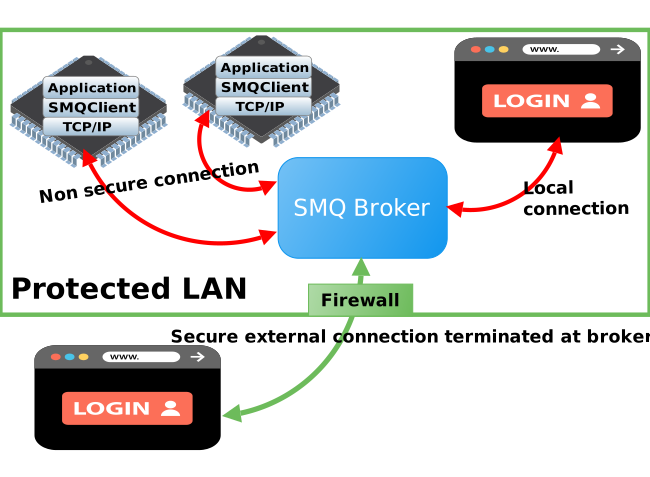
This page explains the security controls available to a Simple Message Queue (SMQ) broker. A production design normally combines transport security, client authentication, topic authorization, input limits, credential lifecycle management, and monitoring. No single control replaces the others.
The following articles provide additional background on layered defenses and the limits of relying on authentication alone:
The following authentication mechanisms can be used with SMQ:
The SMQ protocol includes cleartext credentials and a seed-based hash exchange. Use either mechanism only inside a TLS-protected connection for production deployments.
The SMQ protocol authentication is typically used by devices, but not by SMQ web applications since the password would typically have to be stored as part of the JavaScript code in a web application. Web applications should use HTTP/Web Authentication.
A headless device must obtain its credential through manufacturing, enrollment, or another provisioning process. Avoid one shared credential across an entire fleet. Plan how credentials are rotated and revoked.
The seed-based hash avoids transmitting the original password directly, but it does not provide transport confidentiality, server authentication, or protection from every active or offline guessing attack. It is not a substitute for TLS. If a constrained legacy deployment cannot use TLS, isolate the network, use high-entropy per-device credentials, restrict topics and actions, and document the residual risk.
The following example illustrates how salt-based hash authentication is performed:
C Code (Client Code):
SHA256 sha; /* Assume we have an SHA256 library */
char* username="alice";
char* password="qwerty"; /* :-) */
uint32_t seed;
uint8_t digest[32];
int len;
uint8_t buf[50]; /* username and password must fit */
/* The seed (salt) value is a random number calculated by the broker */
SMQ_init(smq, "https://myserver.com/my-broker-path/", &seed);

/* Calculate a digest based on password + seed */
char s[16];
SHA256_init(&sha);
SHA256_append(&sha, password, strlen(password));
sprintf(s, "%d", seed);
SHA256_append(&sha, s, strlen(s));
SHA256_finish(&sha, digest); /* Get SHA256 digest */

/* Copy username and digest to 'buf' */
len=strlen(username)+1; /* Including string terminator */
memcpy(buf,username,len);
memcpy(buf+len,digest,sizeof(digest));
len += sizeof(digest);

/* Complete SMQ handshake; buf now includes: username \0 digest */
SMQ_connect(smq, uid, uidLen, buf, len, info, infoLen);
Example 1: Calculating the salt-based hash in C code.
This example does not handle errors from SMQ_init and SMQ_connect. See the SMQ Client for more information on these two functions.
This example uses both a username and a password. You do not need to use a username with SMQ authentication, but a username is typically required when using a unique password per device. As an alternative to using a username, the SMQ unique ID may be used instead. The server can store all unique IDs in a database, and the authentication callback function can look up the password (credentials) by using the unique ID as a key.
The corresponding server-side code for handling salt-based hash authentication is shown below. The fictitious method mydatabase:find() looks up the password by using the username as a key. As mentioned earlier, the key could also be the SMQ unique ID.
Lua Code (Server Code):
-- SMQ broker callback function
local function authenticate(credentials, info)
   -- Credentials should have the form: username \0 hash
   -- Use Lua's string library (regex) to extract username and hash
   local uname,hash=credentials:match("^([^\0]-)\0(.+)$")
   if uname and hash then -- Variable 'credentials' has the correct format
      local password = mydatabase:find(uname) -- Find user in database
      if password then
         -- Calculate hash and check if hash is the same as received hash
         if ba.crypto.hash"sha256"(password)(info.seed)(true) == hash then
            return 0 -- Accepted
         end
      end
   end
   return 0x06 -- Connection Refused: Access Denied
end

local broker = require"smq.broker" -- Fetch "broker" module
local options={authenticate=authenticate}
local smq = broker.create(options)
Example 2: Calculating the salt-based hash in Lua and verifying the client's hash.
Function ba.crypto.hash() is part of the server API and enables us to calculate the salt-based hash on password+seed. The seed value, which was sent to the SMQ client, is also provided in the info table passed into the "authenticate" callback. See the documentation for function smq.create() and the optional function argument "authenticate" for details on the info table.
This shortened example reads the password from a fictitious database and omits credential-storage protection. Do not use plaintext password storage in a production implementation. The next section shows the legacy HA1 option supported by the example API.
An interoperability option is to store HA1 values. HA1 is derived from the username, realm, and password for HTTP Digest compatibility. Treat an exposed HA1 value as password-equivalent credential material and protect the user database accordingly. See encrypted passwords for the BAS storage options.
The following pseudo-code shows how the SMQ client would first calculate the HA1 and then calculate the salt-based hash.
HA1 = MD5(username + ":" + realm + ":" + password)
hash = SHA256(HA1 + seed)
Example 3: Calculating salted HA1 -- i.e. SHA256(MD5(credentials) + seed)
On the server side, the HA1 values will be pre-computed and stored as hashed passwords in the user database. The following code snippet is from example 2, where the database has been changed to return hash-based passwords stored as HA1 values.
      -- Database returns pre-computed HA1 values
      local HA1 = mydatabase:find(uname) -- Find user in database
      if HA1 then
         -- Calculate salted HA1 hash and check if hash is the same as received hash
         if ba.crypto.hash"sha256"(HA1)(info.seed)(true) == hash then
            return 0 -- Accepted
         end
      end
Example 4: Verifying the salted HA1 value from example 3 at the server.
Clients using SharkMQ or JavaMQ can use client X.509 Certificate Authentication. When using TLS, the server is always authenticated by the clients connecting to the server. The clients will not connect unless the server's X.509 certificate is trusted by the clients. Client X.509 Certificate Authentication means that we are also using certificates for authenticating the clients. In this case, the server also authenticates each client.
Per-device client certificates require certificate issuance, private-key provisioning, renewal, and revocation procedures. In return, they can provide phishing-resistant, asymmetric client authentication without sending a reusable shared secret to the server. Password authentication may be simpler for some products, but it has different credential-storage, guessing, and rotation risks. Login throttling helps limit repeated guesses; it does not make passwords equivalent to client certificates. Choose the method from the product threat model, manufacturing process, recovery requirements, and available hardware key protection.
Contact Real Time Logic support for more information on using client-side X.509 certificates.
HTTP/Web Authentication is recommended for browser-based solutions using SMQ.js. A browser that has been authenticated using any of the Barracuda App Server authenticators prior to initiating the SMQ connection will be authenticated when the SMQ connection is established.
The SMQ authenticator can easily detect if the client (the browser) is authenticated by checking that 'uname' is set on the info table passed into the authenticator callback function. The variable 'uname' is not set if not authenticated.
The following code snippet shows how to find out if the browser is authenticated.
-- SMQ broker authenticator callback function
local function authenticate(credentials, info)
   if info.uname then
      -- Browser has been authenticated by using HTTP/Web Authentication
   else
      -- Not a browser or browser is not authenticated
   end
end
Example 5: Verifying pre-authenticated HTTP/Web client.
SMQ authorization has been designed such that authorization must be done programmatically by adding authorization callback functions to the SMQ broker.
Authorization callbacks restrict topics, subscriptions, publishers, and message content. They must be applied even when clients authenticate. An unauthenticated mode is appropriate only for intentionally public operations whose data and effects remain safe for any network client.
Sometimes authorization is performed differently for each client connected. All authorization callbacks get the client's peer table as an argument. In addition to the values set by the broker, the peer table can be used for storing additional values that can be used to uniquely identify a particular client. This information can then be used for performing authorization.
Unique information for a particular client can be built as part of the authentication and connect sequence. The following example shows how we can build information when a client connects and authenticates.
Assume the SMQ client uses the URL https://myserver.com/mybroker/?color=blue. The color query parameter is untrusted client input and must not be treated as identity.
function authenticate(credentials, info)
   -- fictitious method mydatabase:authenticate() returns true/false
   info.isAuthenticated = mydatabase:authenticate(credentials)
   return 0 -- Accept even if not authenticated
end

function onconnect(tid, info, peer)
   peer.isAuthenticated = info.isAuthenticated -- From authenticate callback
   if not peer.isAuthenticated and info.uname then
      peer.isAuthenticated = true
   end
   peer.color = info.data.color -- From URL
end

local smq = require("smq.broker").create{
   authenticate=authenticate,
   onconnect=onconnect
}
Example 6: Building unique SMQ client information and inserting into peer table.
In this example, we carry forward the data provided by the client's URL (the color) and the authentication status. The "onconnect" callback further evaluates the authentication status by also checking whether the client is authenticated by HTTP/Web authentication (line 9). We set 'isAuthenticated' and 'color' in the peer table. This information can later be used by other callbacks, such as the authorization callbacks. See the authenticate and onconnect callbacks for details on the arguments used in example 6.
Authorization can be performed by the following three callbacks:
The callback functions "permittop" and "permitsubtop" are called if a client wants to create a topic ID (tid) for a topic and subtopic that is not registered in the broker. Function "permittop" is also called when a client subscribes to a topic.
You can create all topics and subtopics used by your application in the server as part of the initialization sequence after creating a broker. You can then deny all attempts at creating new topics or subtopics. Let's assume we have an application that only uses one topic, "/temperature". The following example shows how to pre-register the topic in server code and then deny all other attempts at creating topics and subtopics.
local function permitsubtop(subtopic, peer)
   myLogFunc("Warning: nasty client attempting to create subtopic")
   return false -- Deny
end

function permittop(topic, issub, peer)
   if issub then -- A subscribe request. We must still allow this.
      if topic == "/temperature" then
         return true  -- Grant access.
      end
      myLogFunc("Warning: nasty client attempting to subscribe to topic")
   else
      myLogFunc("Warning: nasty client attempting to create topic")
   end
   return false -- Deny
end

local smq=require("smq.broker").create{
      permittop=permittop,
      permitsubtop=permitsubtop
}

smq.create("/temperature") -- Pre-create topic
Example 7: Setting constraints on creating topics, subtopics, and subscribing to topics.
On line 23, this example pre-creates the topic used by the application. The broker will then create a unique topic ID (tid) for this topic name. The "permittop" callback (line 6) will not be called if a client attempts to create this topic since it has already been created by the server code (line 23). However, the "permittop" callback will be called each time a new client subscribes to this topic, so we would normally allow this (line 9) unless you have a specific constraint for the client performing the request. Note that we do not allow any use of subtopics. Function "permitsubtop" simply returns false for any request.
The onpublish callback enables fine-grained control of all published messages. The callback is called by the broker after receiving the message from the sender and just before republishing the message to all subscribed clients. Note that the number of subscribed clients will be only one if the message is published to an ephemeral topic ID in one-to-one communication.
The following example shows how to create a basic onpublish constraint function that allows messages less than 100 bytes in size; however, the SMQ server client is allowed to send messages of any size.
local smq -- An SMQ broker instance

function onpublish(data, ptid, tid, subtid, peer)
   if #data < 100 then
      return true -- Grant; Message size less than 100.
   end
   -- If publisher's topic ID is the ID of the server SMQ client.
   if ptid == smq.gettid() then
      return true -- Grant; Server can send any size.
   end
   return false -- Deny; Broker drops the message
end
Example 8: Setting constraints on message size.
Based on examples 6 and 7, we can create an onpublish constraint function that prohibits publishing "/temperature" if the client is not authenticated. The advantage of this example is that it enables non-authenticated clients to subscribe to "/temperature", but not to publish to "/temperature".
local smq -- An SMQ broker instance initialized on line 13 below

function onpublish(data, ptid, tid, subtid, peer)
   -- Only allow publishing to "/temperature"
   if tid == smq.topic2tid"/temperature" then -- This can be optimized
      if peer.isAuthenticated then -- Set in example 6
         return true -- Grant
      end
   end
   return false -- Deny
end

smq = require("smq.broker").create{
   authenticate=authenticate,
   onconnect=onconnect,
   permittop=permittop,
   permitsubtop=permittop,
   onpublish=onpublish
}
Example 9: Only authenticated clients can publish.
These callbacks let server code grant or deny specific actions. In a mixed environment, keep public operations narrow and read-only where possible, deny all other operations by default, and make every authorization decision from server-controlled state. Do not treat a topic name, URL parameter, or other client-provided value as proof of identity.
To learn more about creating an application that uses the SMQ protocol in a mixed authenticated and unauthenticated environment, download and study the Light Controller App. Open the server application's .preload script and look for the code section named "Security section".
The SMQ broker can terminate TLS for one connection and forward the resulting message to a client on another connection. If the second connection is not protected by TLS, its traffic is exposed on that network segment. Use this arrangement only on an explicitly trusted and isolated network, and do not describe it as end-to-end encryption. Prefer TLS on both segments when the target supports it.